> For the complete documentation index, see [llms.txt](https://nx.docs.scailable.net/llms.txt). Markdown versions of documentation pages are available by appending `.md` to page URLs; this page is available as [Markdown](https://nx.docs.scailable.net/ai-manager-v6.1.4/ai-manager-plugin/configure-the-plugin/plugin-settings/input-masks-and-roi/exclusive-masks.md).

# Exclusive Masks

Limit inference to outside a drawn polygon.

Exclusive input masks ignore objects that are fully inside the drawn mask area. Create these masks on the video frame inside the AI Manager's Model Settings, in the **Input Masks** section.

Select **Exclusive** from the **Mask Type** dropdown:

<figure><img src="https://2982163321-files.gitbook.io/~/files/v0/b/gitbook-x-prod.appspot.com/o/spaces%2FKGfC0TFSmuMDjbpLErO3%2Fuploads%2Fgit-blob-9fc38b213e792fbf668c26edfba4e9fd51d77e90%2Fclient-ai-manager-mask-type-dropdown.png?alt=media" alt="Model Settings panel with the Input Mask Type dropdown open, showing Inclusive and Exclusive options"><figcaption><p>Choosing the Exclusive mask type</p></figcaption></figure>

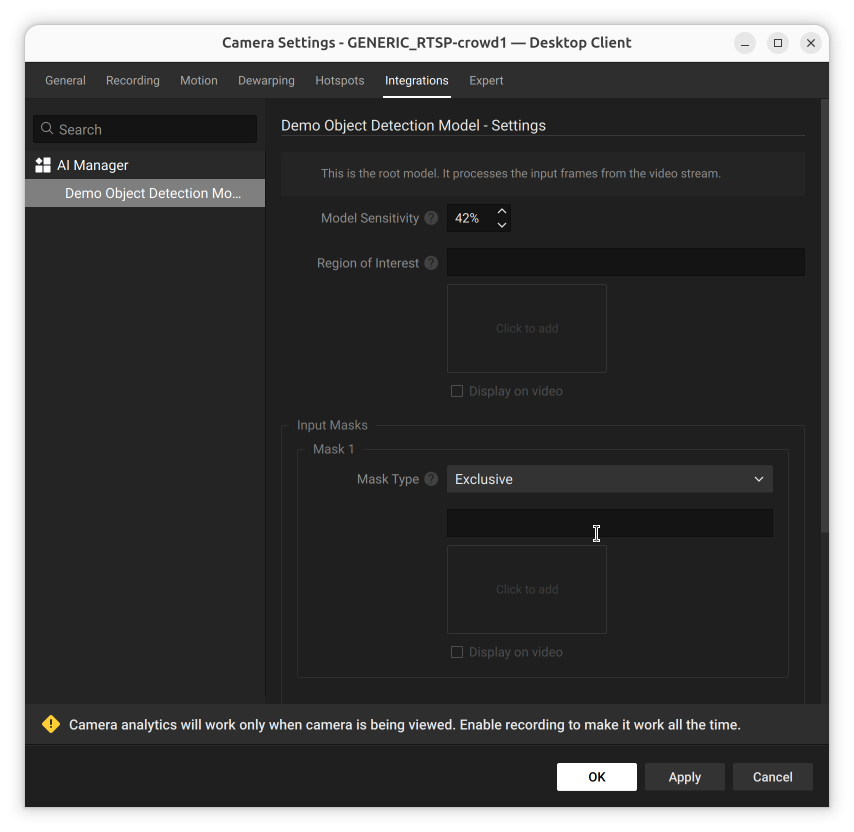
Choosing Exclusive leaves the shape field empty until you draw a mask:

<figure><img src="https://2982163321-files.gitbook.io/~/files/v0/b/gitbook-x-prod.appspot.com/o/spaces%2FKGfC0TFSmuMDjbpLErO3%2Fuploads%2Fgit-blob-e949ca52e3a4c268153091ab6c57accef55a9a37%2Fclient-ai-manager-model-settings-exclusive-mask.png?alt=media" alt="Model Settings panel with Mask Type set to Exclusive and no shape drawn yet"><figcaption><p>Exclusive mask type selected, no shape drawn yet</p></figcaption></figure>

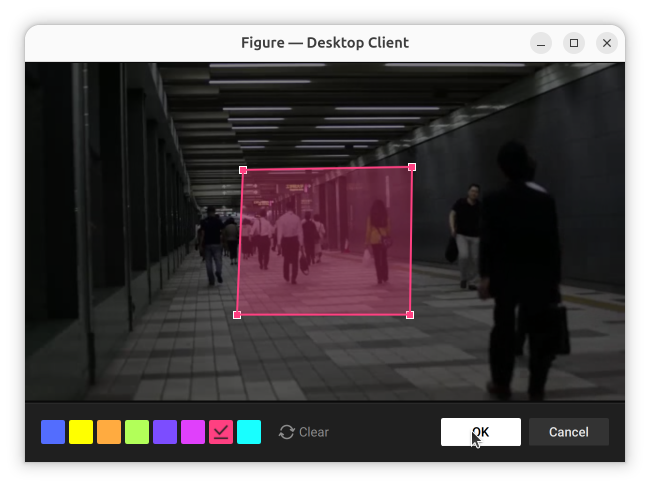
Click inside the mask's shape field to open the figure editor and draw the mask over the frame:

<figure><img src="https://2982163321-files.gitbook.io/~/files/v0/b/gitbook-x-prod.appspot.com/o/spaces%2FKGfC0TFSmuMDjbpLErO3%2Fuploads%2Fgit-blob-0d479deb32ae6ce271faefa4ddf098e35c59810f%2Fclient-exclusive-mask-figure-editor-shape-drawn.png?alt=media" alt="Figure editor dialog with a pink rectangle drawn over part of a crowded corridor camera image, resize handles visible"><figcaption><p>Drawing an exclusive mask shape in the figure editor</p></figcaption></figure>

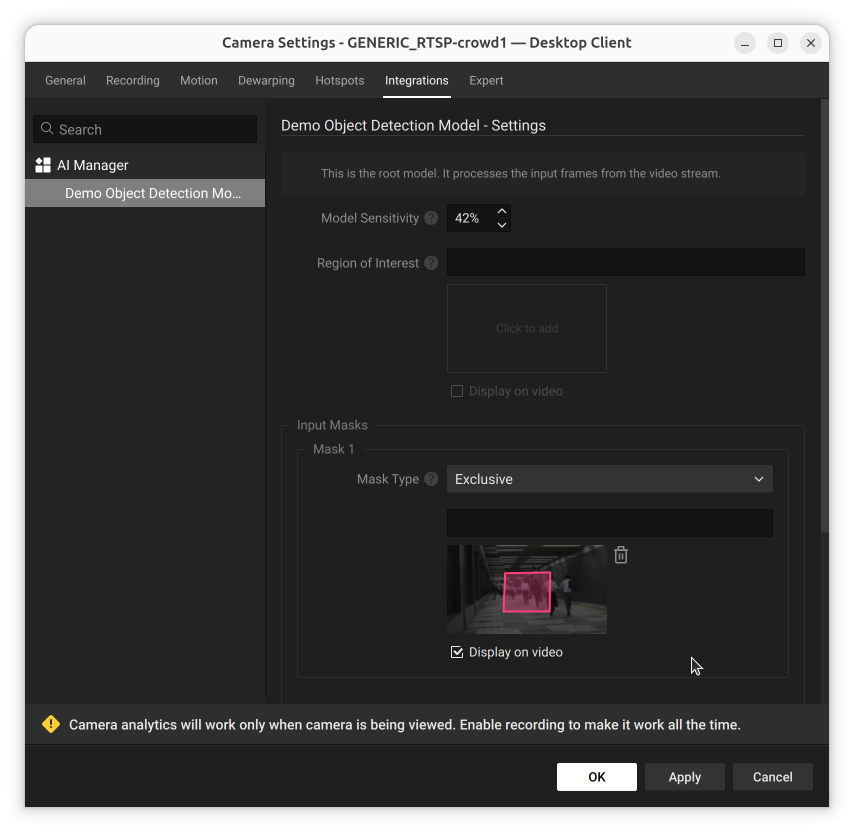
Click **OK** to save the shape. A thumbnail preview appears in the mask's shape field, with a **Display on video** checkbox to show the mask as an overlay in Live View. Add more masks with the **Add** button.

<figure><img src="https://2982163321-files.gitbook.io/~/files/v0/b/gitbook-x-prod.appspot.com/o/spaces%2FKGfC0TFSmuMDjbpLErO3%2Fuploads%2Fgit-blob-b17fe41b8b3ff3d3b88e814d185fcb066e46ac23%2Fclient-ai-manager-model-settings-exclusive-mask-preview.png?alt=media" alt="Model Settings panel showing an Exclusive input mask thumbnail preview with a pink polygon drawn over part of the camera image"><figcaption><p>Input Masks setting with an exclusive input mask</p></figcaption></figure>

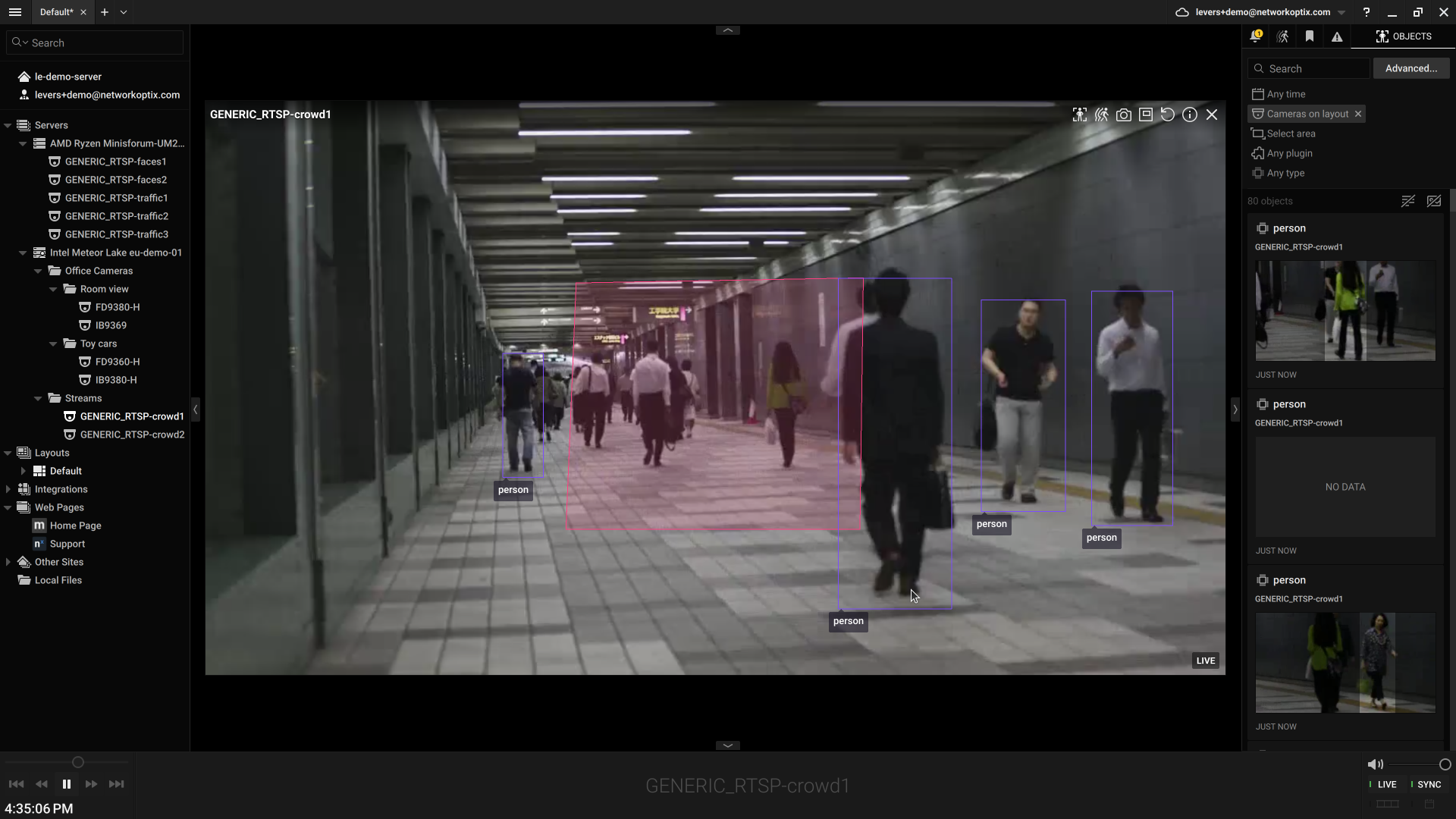
Confirm it in Live View: detections inside the mask area are ignored, detections elsewhere are still returned.

<figure><img src="https://2982163321-files.gitbook.io/~/files/v0/b/gitbook-x-prod.appspot.com/o/spaces%2FKGfC0TFSmuMDjbpLErO3%2Fuploads%2Fgit-blob-bdff33eccd627c1987ca1ebd0084401a472a31d7%2Fclient-live-view-exclusive-mask-overlay.png?alt=media" alt="Live View of a crowded corridor showing a pink exclusive mask overlay over part of the frame, with detections still boxed in the rest of the frame"><figcaption><p>Exclusive mask overlay in Live View</p></figcaption></figure>

In practice, results overlap the polygon borders slightly because the anchor location for a detected object is the middle of the bottom of the detection box.

{% hint style="info" %}
The center of the bottom of the bounding box is chosen for the anchor location because that is usually a good indication for where a person or object is standing on the ground. In a line-crossing scenario for example, this would make it easier to detect if a person crosses a certain line.
{% endhint %}

{% hint style="warning" %}
Using an input mask and a region of interest at the same time is not supported.
{% endhint %}

Click **Apply** for changes to take effect.